
How to Use the Editor Panel
The editor panel lets you review and maintain a single piece of content while editing it.
Open a Post or Page in the Block Editor
The panel appears inside the WordPress Block Editor for enabled post types.
Look for:
Content Maintenance
in the document sidebar.
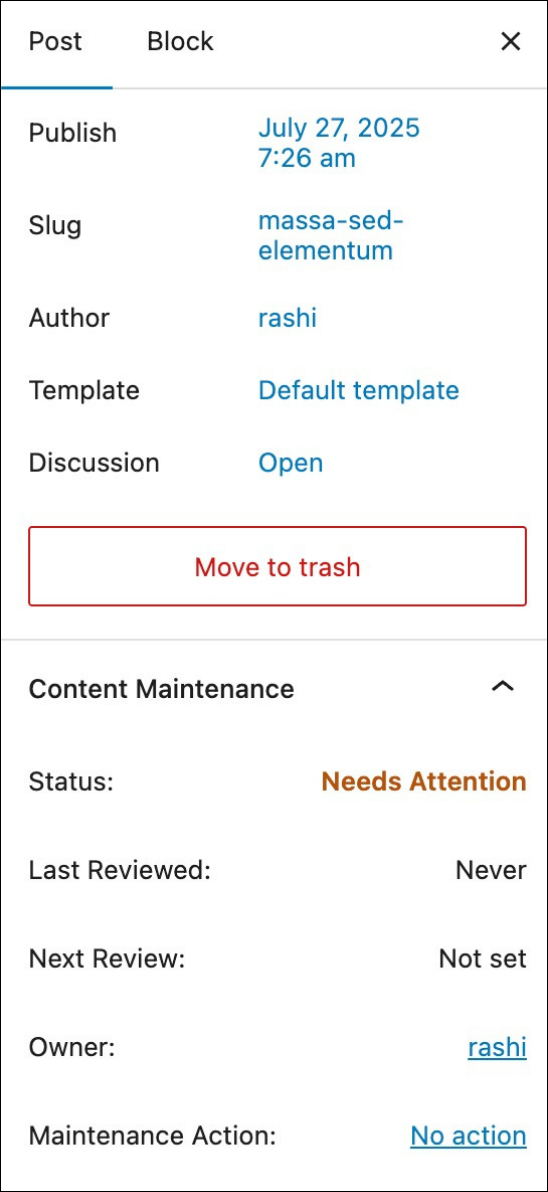
What the Panel Shows
The panel displays:
- current status
- last reviewed date
- next review date
- current owner
- maintenance action
This gives you a quick view of the content’s maintenance state while you edit it.
Change the Owner
Use the Owner field to assign responsibility for the content.
This is helpful when different team members are responsible for keeping different sections of the site up to date.
Choose a Maintenance Action
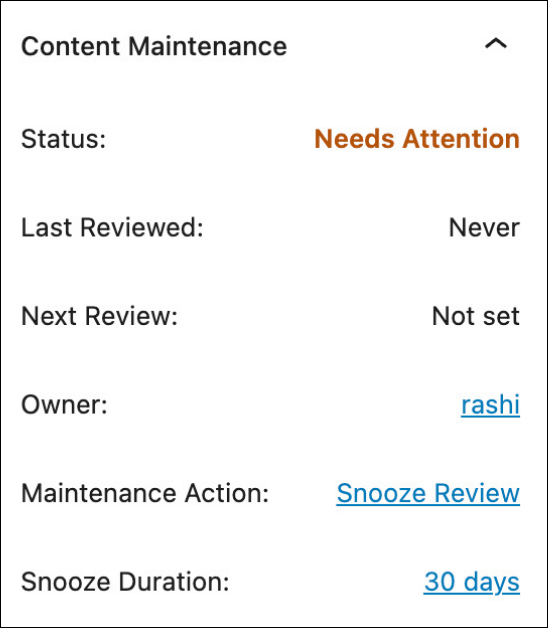
Use the Maintenance Action field when you want to update the content lifecycle state.
Available actions include:
Mark as ReviewedSnooze ReviewArchive ContentUnarchive Content
If you choose Snooze Review, additional options appear so you can choose the snooze duration or a custom date.
Save the Post to Apply the Action
Maintenance actions are applied when you save or update the post.
This means you can:
- choose the action
- save the post
- let the plugin apply the lifecycle update at save time
